Lab 02-01: Sierra Wireless HL7802 Cellular Module with Windows Simulator
This lab requires a HL780x/mangOHRed Development kit. In this lab, we use the HL7800 EVAL board from here
The source code for this lab is in a temporary location. Please read-thru the known issues/work in progress items
Clarifications/To Be Discussed
-
Will ther HL7802 module able to resilient from poorly designed Host MCU applications (e.g. the PDP Activate/DeActivate continuosly). Is there any specical design considerations/any recommendations for the reference AWS cellular manager implementation available with the demo.
-
Is it mandatory to comply with GSMA TS34/35 Device Connection Efficiency Specifications. Link here
Known Issues/Pending Items
Issue #1
Problem Description
Sierra Wireless AT cmd Set don’t support GetHostByName.However, FreeRTOS secure sockets layer expects this as a mandatory API.
Workaround 01
In the latest commit, secure sockets cellular can be used without hardcoding the ip(workaround #2 isn’t required).
For HL7802 in the file vendors/pc/boards/windows/aws_demos/config_files/aws_cellular_config.h, set it to 0
#define CELLULAR_SUPPORT_GETHOSTBYNAME ( 0 )
Workaround 02 [ Use this, only if the previous workaround dont’ work ]
The IP address of the IoT core endpoint, shall be hard-coded in the source code for the Mqtt Demo Test. AWS shall further find a way, how to modify the implemenation if it isn’t feasible to map this operation to sierra wireless AT-cmd set.
Note : If Workaround #01 is used, and if it DNS name isn’t resolved, set the below values do manual-hard coding of IP address.
#define CELLULAR_SUPPORT_GETHOSTBYNAME ( 1 ) #define CELLULAR_IP_ADDRESS_MAX_SIZE (255U)
Procedure for Hard-coding the IP address:
- Lookup the IP address of the AWS IoT Core Endpoint. To lookup the IP address of the AWS IoT core endpoint, login to the AWS IoT Management console & then Navigate to the “settings” menu. Copy the “AWS IoT Core Endpoint” name. Use any tool of your choice to lookup the IP address for the Domain endpoint. In win-10, you can use “nslookup” as mentioned below
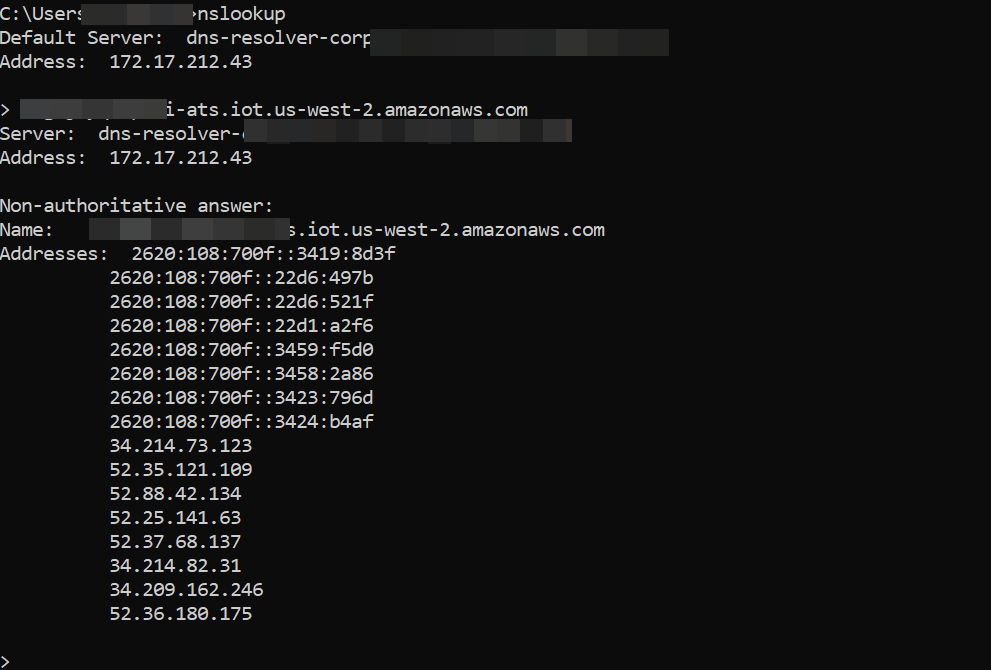
- Hard-code one of the IP address in the function “Cellular_GetHostByName”, in file FREERTOS_BASEDIR/vendors/sierra/modules/hl7802/ports/cellular/cellular_hl7802_api.c
Issue #2
Problem Description
URC Commands for PSM State Changes Notifications & related modem events
Workaround
Suggestion was provided to use the DTR/CTS signals here. However, AWS comm Interface isn’t provisioned to accomodate this variation of Idle mode wake up detection. The current AWS comm interface, expects it to provide via., AT cmd set.
Issue #3
Problem Description
Optimise the implementation of the TCP Data Read, Get Signal Strength Info, Re-scan operations & validate the HL7802 Network Registration Flow
Suggestions
Sierra to review the AWS implementation & provide feedback. Further optimisation of the cellular HAL to be done, along with the BX3105 implementation.
Issue #4
AT Command Clarification
RegisterUrcSignalStrengthChangedCallback : To be confirmed. If it exists, the implementation shall be updated.
SetDNS : confirm AT+KCNXCFG : To be confirmed
Issue #5 [ Pending Tests for the various possible combinations of configurations
3GPP AT command Tests - AWS AT cmd response parsing tests to validate all the possible network configuration options. There could be a lot of permutations here.
Source Code Location
git clone https://github.com/chinglee-iot/amazon-freertos.git --recurse-submodules -b feature/cellular_hl7802
Development Kit Setup
TO DO
Enable the HL7802 module from the build
The FreeRTOS build configuration for Windows Simulator defaults to quectel BG-96. Please make the below change to enable/override the default configuration to build for HL7802 cellular module.
- Navigate to the file $FREERTOS_BASEDIR\vendors/pc/boards/windows/CMakeLists.txt
- Search for the below text [Cellular module port] and replace the quectel bg96 with sierra hl7802
	- include("${AFR_VENDORS_DIR}/quectel/modules/bg96/CMakeLists.txt")
	+  include("${AFR_VENDORS_DIR}/sierra/modules/hl7802/CMakeLists.txt")
endif()
Troubleshooting
How-To Enable Debug Logs
** Change the Log level to “IOT_LOG_DEBUG” in the file $FREERTOS_BASEDIR/vendors/aws/modules/3gpp/ports/cellular/include/private/cellular_internal.h
This shall print more debug information on the console to facilate troubleshooting. details of the AT command request/responses are displayed.
Enabling/Disabling Tests
To enable/disable selected test cases, it can be updated in the source file $FREERTOS_BASEDIR\libraries\abstractions\cellular\test_cellular_api.c
search for TEST_GROUP_RUNNNER (Full_CELLULAR_API).
Run the AWS IoT Mqtt Demo
TO DO
Follow the instructions from Lab01-01/BG-96 from Windows Simulator.
Steps to Run the aws_tests project
Enabling the integration tests from FreeRTOS, involves the below steps. The configuration files for the aws_demos & the aws_tests are independent. Hence the configuration file need to be updated accordingly.
i) Configuration of the cellular network specific settings
ii) When testing from laptops without wired Ethernet, the “vApplicationIPNetworkEventHook”, wont’ run, so manually override in this mail loop
iii) AWS IoT Device Provisioning
iv) Updating the cmake project to run the AFR Tests/aws_tests **
[i] Configuration of the cellular network/test environment specific settings
Below are the configuration pre-requisites for aws_tests.
-
Edit the file “vendors/pc/boards/windows/aws_tests/config_files/aws_test_runner_config.h” with the following test config. Enable Cellular_API tests & disable the TCP tests
#define testrunnerFULL_CELLULAR_API_ENABLED 1 #define testrunnerFULL_TCP_ENABLED 0 -
Edit the file “tests/include/aws_test_tcp.h” with the following information
#define tcptestECHO_SERVER_ADDR0~3 <TCP_ECHO_SERVER_ADDR> #define tcptestECHO_PORT <TCP_ECHO_SERVER_PORT> -
Edit the file “tests/include/aws_test_cellular.h” with the following information
#define testCELLULAR_APN "" #define testCELLULAR_DNS_SERVER_ADDRESS "" #define testCELLULAR_HOST_NAME "" #define testCELLULAR_HOST_NAME_ADDRESS "" -
Edit the file “vendors/pc/boards/windows/aws_tests/config_files/aws_secure_sockets_config.h”
#define socketsconfigBYTE_ORDER <host mcu byte order> -
Edit the file vendors/pc/boards/windows/aws_tests/config_files/FreeRTOSConfig.h
configNETWORK_INTERFACE_TO_USE
-
vendors/pc/boards/windows/aws_tests/config_files/aws_cellular_config.h
cellularconfigCOMM_INTERFACE_PORT
[ii] Manual Override
Temporary override, create a new function
	static void testRunnerTask( void * pvParameters )
	{
	    /* Connect to the cellular network before running the demos. */
	    prvSetupCellular();

	    TEST_RUNNER_RunTests_task( pvParameters );
	}
Disable the Network initialisation in main()
 /* Initialize the network interface.
     *
     ***NOTE*** Tasks that use the network are created in the network event hook
     * when the network is connected and ready for use (see the definition of
     * vApplicationIPNetworkEventHook() below).  The address values passed in here
     * are used if ipconfigUSE_DHCP is set to 0, or if ipconfigUSE_DHCP is set to 1
     * but a DHCP server cannot be contacted. */
   // FreeRTOS_printf( ( "FreeRTOS_IPInit\n" ) );
    /*FreeRTOS_IPInit(
        ucIPAddress,
        ucNetMask,
        ucGatewayAddress,
        ucDNSServerAddress,
        ucMACAddress );
 */

    /* Initialize AWS system libraries. */
    SYSTEM_Init();

    vDevModeKeyProvisioning();


    xTaskCreate( testRunnerTask,
                     "TestRunner",
                     TEST_RUNNER_TASK_STACK_SIZE,
                     NULL,
                     tskIDLE_PRIORITY, NULL );

    vTaskStartScheduler();
[iii] AWS IoT Device Provisioning
Though the AWS IoT device credentials at the cloud side can be reused to run the aws_tests,the configuration files for the aws_tests need to be updated manually. The python script don’t update the, aws_clientcredential.h & aws_clientcredential_keys.h for the aws_tests project.
Update the below configuration per your local environment setup
$FREERTOS_BASEDIR/tests/include/aws_clientcredential.h
#define clientcredentialMQTT_BROKER_ENDPOINT "”
#define clientcredentialIOT_THING_NAME "”
$FREERTOS_BASEDIR/tests/include/aws_clientcredential_keys.h
#define keyCLIENT_CERTIFICATE_PEM NULL
#define keyCLIENT_PRIVATE_KEY_PEM NULL
[iv] Updating the cmake project to run the AFR Tests/aws_tests
Prerequisite: Update the CMakelists.txt to build hl7802 module
cmake -DVENDOR=pc -DBOARD=windows -DCOMPILER=msvc -G"Visual Studio 16 2019" -DSECURE_SOCKETS_CELLULAR=1 -DBOARD_HAS_CELLULAR=1 -DAFR_ENABLE_TESTS=1 -B build-hl7802
cmake --build build-hl7802 --clean-first